top of page
Before the Light Fades game development, technical art and concept art breakdown. includes info, technical art breakdowns, development process, character sheets, props and environment sheets.

Before The Light Fades

A top-down 2D survival game built in Unity, developed and illustrated entirely by me. I designed the visuals, created and implemented gameplay systems, custom tools, UI, and spell mechanics — focusing on smooth asset integration, scripted VFX, and a cohesive hand-painted visual pipeline.

Role: Technical Artist / Game Developer / Concept Artist

Engine: Unity 6 (2D)

Tools: Unity, C#, Photoshop, AI-assisted tools

Overview

A suspenseful top-down magic game set in a dark forest with limited light as a resource. I developed the entire project from concept and art direction to AI-assisted animation, system programming, custom tools, and a synchronized audio-visual intro, creating all mechanics, assets, and workflows from scratch.

Responsibilities & Technical Focus

Gameplay Video

Before The Light Fades Gameplay Video (Wave 1 only)

Concept Art & Visual Direction

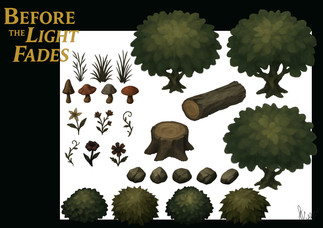
  • Designed characters, monsters, items, props, and environmental tiles, combining sketches and AI Tools (ChatGPT)

  • Used Pollo AI for animations, refined in Photoshop for accuracy and consistency.

  • Ensured visual consistency across game assets, UI, and environment.


Asset Integration & Scene Setup

  • Imported and configured 2D assets.

  • Built the tile-based background in Unity, ensuring seamless repetition and natural blending between tiles.

  • Created prefabs for environment props, collectibles, and enemies.

A dark forest grid map with glowing points scattered among trees. Rectangles highlight areas. Mysterious and strategic vibe.
A tile map background in Unity Editor showcasing a dense forest area with environmental props, highlighting the game's environment layout and design.

Project folder view showing a hierarchy of assets. Focus on "Flowers&Weeds&Mushrooms" with items like Flower, Mushroom, and Weed listed.
Project assets folder displaying organized environmental prop prefabs.

Gameplay Systems & Logic

  • Developed core systems in C#, including:

    • Combat and Projectile System: Player attacks use projectile prefabs that spawn, animate, and self-destruct on collision or timeout, targeting the mouse cursor with automatic facing.

    • Wave System: Manages enemy spawning, item drops, and transitions between waves.

    • Save System: Saves and reloads the last completed wave for resuming or restarting.

    • Item Drop Logic: Defines drop items per wave, randomly assigning carriers among enemies, spawning items at their position upon defeat.

  • Implemented item collection, victory conditions, and pause functionality.

  • Developed precise input handling and attack direction mapping for responsive mouse control.

C# script for game save management, featuring methods for saving, loading, and deleting progress. Uses PlayerPrefs and includes tooltips.
Script for SaveManager in Unity: Handles game progress with methods to save, load, and delete player data using PlayerPrefs.
The player defeats the monster and acquires a drop item to progress to the next level (wave)

Custom Editor Tools

  • EnemyAIMaker: Opens a custom Editor window for users to:

    • Include a prefab for the enemy's appearance.

    • Define stats like health, chase speed, roam speed, and detection range.

    • Automatically create a C# script with selected parameters and assign it to the enemy prefab.

  • EnemySpawner Tool: Allows users to:

    • Set the number of enemies per wave.

    • Assign enemy prefabs for each wave.

    • Randomly spawn enemies within a user-selected area, visualized with purple gizmos in Unity Scene view.

    • Assign a wave drop item prefab, determine how many enemies carry it, and auto-assign it to random enemies; the item spawns when the carrier is defeated.

  • Random Environment (2D Prop) Spawner:

    • Distributes environmental assets (trees, rocks, collectibles, etc.) across the map at random positions with a selected interval each game.

    • Ensures a unique map layout and collectible placement pattern for each playthrough.

UI screenshot of "Enemy AI Maker" tool showing settings for enemy AI script generation, including movement, attack, and animation details.
The Enemy AI Maker window interface displaying configuration options for AI scripting.
Grid-covered forest scene with glowing elements, an overlay shows GUI for enemy spawning. Purple and white boxes indicate spawn areas.
The Enemy Spawner window interface, and a visual grid highlighting the user-selected spawn area.
A 2D Prop Spawner interface with settings for prop spawning, including number, area size, center, and distance. Buttons to clear or spawn props.
The 2D Prop Spawner window interface displays settings for spawning props.

Code snippet in Visual Studio shows C# script for an "Enemy AI Script Generator" with variables for speed, attack, and other AI settings.
Code snippet for a Unity editor script titled "Enemy AI Maker", designed to create and customize enemy AI behavior with various parameters.

Animation & Enemy Behavior

  • Generated animations with Pollo AI, corrected frames in Photoshop.

  • Imported sequences into Unity, compiled into animation clips for the Animator Controller.

  • Configured state transitions for enemy and player actions (walk, idle, attack, death).

  • Scripted directional attacks and movement based on mouse direction.

  • Dynamically adjusted animation speed based on enemy behavior (roam, chase, attack).

A gnome with a red hat faces a shadowy figure in a dark forest. Trees and stumps dot the grassy scene. Red health bar shown in corner.
Player in combat using directional mouse attack mechanics.
A character in red moves through a dark, forested area with large bushes and scattered flowers. A health bar is visible in the top left.
Player in combat using directional mouse attack mechanics.

UI & Player Feedback

  • Designed a heart health crystal and orb mana UI with custom animations.

  • Created a scripted animation controller to convert animation frames into percentage values based on current health.

  • Applied the same technique to the mana orb, which regenerates with new magic crystals.

  • Implemented timed health regeneration using coroutine timers.

  • Developed wave UI, pause menu, and victory screens with scripted activation states.

Heart Health Crystal Animation Sheet
Mana orb Animation Sheet

Pixelated heart and five red segments on a dark, grassy background. Flowers and rocks scattered. Gaming interface.
Health bar user interface with a heart crystal animation based on player's health
A glowing blue orb placed on a leafy green background next to an empty square frame. The scene is serene and mystical.
The user interface of the current magic spell alongside an animated mana orb, showcasing dynamic changes in the interface.
Code snippet in C# for a Unity script. It includes coroutines for animation effects: PlayToTarget and PulseEffect, with timing and scaling logic.
A script snippet demonstrating an animation controller for the heart crystal. This example includes smooth transitions based on the player's health and a reactive pulse effect when the player takes damage.

Lighting & Visual Effects

  • Developed a flickering light system to visually warn players of light duration: each light orb illuminates surroundings for a set time, flickering and fading as time expires.

  • Designed all spell impact and hit feedback as animated prefab-based VFX, synchronized with projectile collisions for attacks and enemy damage.

A character in a red hood explores a dark forest, with a heart health bar in the corner and various trees and foliage visible.
The character picking up a light orb, which brightens the area around.

A person in a red hood walks in a dark, forested area with large trees and mushrooms. A red health bar is visible in the top-left corner.
The light around the player is flickering and dimming, indicating that it's running out.


Purple and yellow lightning bolts branching out against a dark checkered background, creating a dynamic and energetic visual effect.
Hit Lightning VFX Animation Sheet
Blue spiky starburst patterns on a segmented white and blue background, arranged in a grid. Vibrant and dynamic abstract design.
Hit Water VFX Animation Sheet
Top-down view of a forest scene with a character in a red hat facing a dark creature. Trees and stumps surround them under dim light.
Lightning Attack and Hit VFX


A character in a red cape walks through a dark, wooded area with lush greenery. A health bar is seen in the top-left corner.
Water Attack and Hit VFX

Intro Scene System

  • Developed a C# intro sequence with AI voice narration, synchronized text, and timed images.

  • Managed playback, transitions, and timing for alignment of captions and visuals with narration.

C# script shows a PlaySlideshow method in Visual Studio. It controls image and text display using loops and coroutines for fade effects.
Slideshow Script Snippet: This coroutine handles displaying images and text in a sequence, utilizing fade in and fade out effects with adjustable display times.
Screen Recording of The Game Intro Scene

Organization & Workflow

  • Ensured organized structure in Photoshop and Unity with consistent naming for sprites, scripts, prefabs, and UI elements.

  • Created prefabs for interactive and environmental elements for quick iteration and reuse.

Unity hierarchy window screenshot showing game objects: MainLevel, EnvironmentProps, SpellCrystals, LightOrbs, Player, Enemies.
Unity Hierarchy View: A detailed look at the MainLevel assets, showcasing various prefabs such as SpellCrystals, LightOrbs, and enemies for structured game development.

Project file structure in a software interface showing categories like Assets, Scenes, Scripts, with folders and subfolders in a list.
Neatly organized Unity project assets folder showcasing an efficient structure with categorized subfolders such as Audio & Sounds, Characters, Materials, and Scripts.


© 2025 כל הזכויות שמורות לקארן פינקל

bottom of page